

Install the plugin
Install the plugin
In Feishu, open the Plugin Marketplace, search for 文档智能解析(转 markdown), and install it.
Get an API key
In your Bitable workflow action, you need to fill in API Key. Prepare your SoMark API key in advance.
No API key yet? Go to the SoMark API workbench to get your API key. Free quota does not need to be claimed and is automatically credited to your account (500 pages/day, 2000 pages/month).
Use the plugin in a Bitable workflow
Prepare fields in your Bitable
In your target Bitable, prepare an Attachment field to upload/store files. If you want to save the parsed result back into Bitable, add a Text field (optional).
Configure a trigger
Choose a trigger (for example Record created/updated or Manual trigger) and make sure the trigger provides the record variables that include your attachment field.
Configure input variables
Configure the following fields in the action panel:
- Select document: Bind it to the attachment field from your trigger (or a file output from a previous step).
- API Key: Paste your SoMark API key, or click the + button on the right to insert a workflow variable/secret (recommended).
- (Optional) Configure other parameters such as Output Formats, Image Format, Formula Format, and Table Format as needed. If left empty, defaults apply. If you don’t select Output Formats, the action returns both
MarkdownandJSONby default. See Input parameters below for details.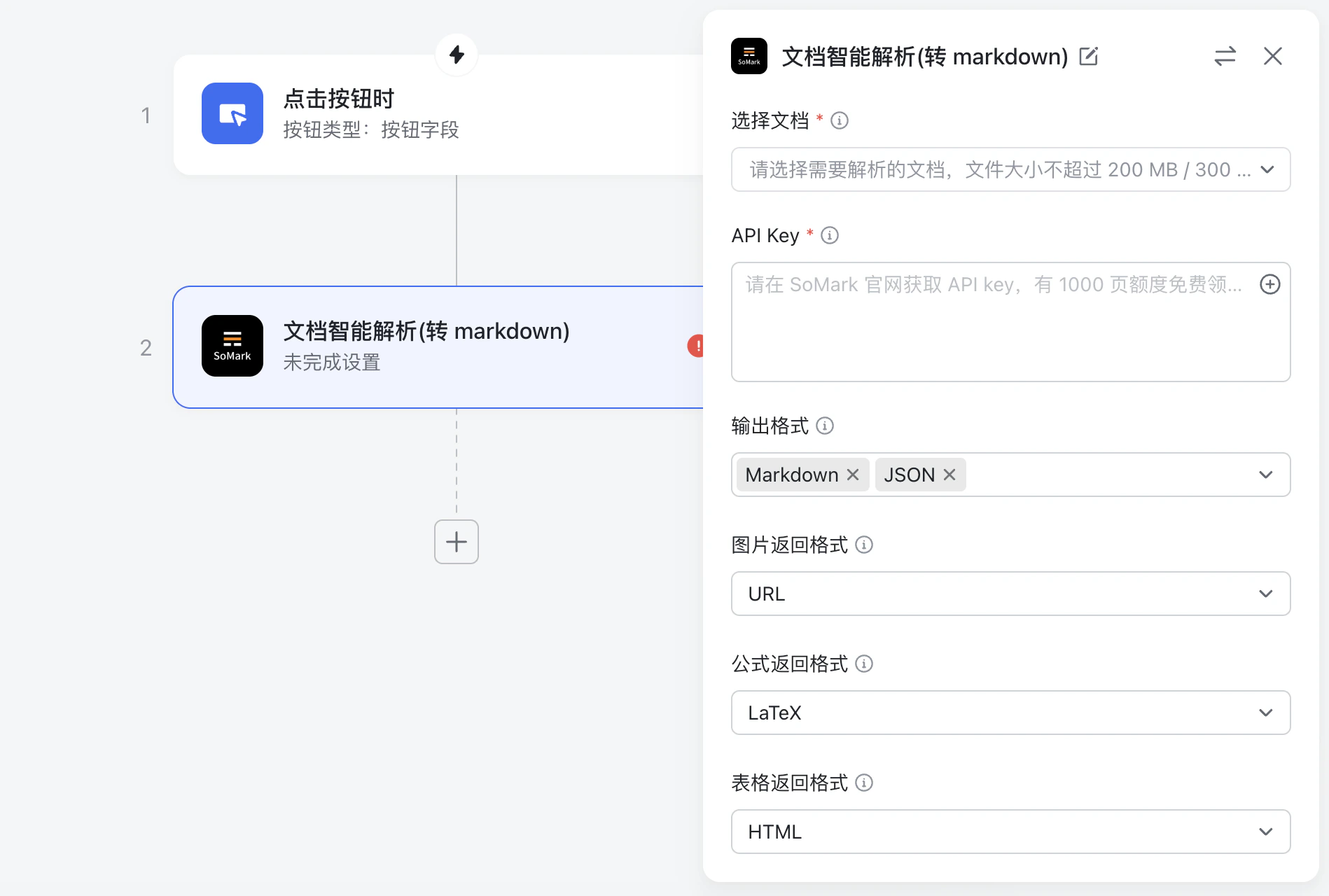
Parameters and outputs
Input parameters
| Parameter | Type | Description |
|---|---|---|
Select document (选择文档) | Attachment field | The document to parse |
| API Key | Text | Your SoMark API key. Prefer injecting it via a workflow variable mapping instead of hardcoding it |
Output Formats (输出格式) | Multi-select | Markdown or JSON. Default: Markdown,JSON |
Image Format (图片返回格式) | Single-select | URL, Base64, none. Default: URL |
Formula Format (公式返回格式) | Single-select | LaTeX, MathML, ASCII. Default: LaTeX |
Table Format (表格返回格式) | Single-select | HTML, Markdown, Image. Default: HTML |
Chemical Structure Format (化学结构式返回格式) | Single-select | Currently supports Image only. Default: Image |
Enable Text Cross Page (文字跨页拼接) | Single-select | Default: Off |
Enable Table Cross Page (表格跨页拼接) | Single-select | Default: Off |
Enable Title Level Recognition (标题层级识别) | Single-select | Default: Off |
Enable Inline Image (保留文中图) | Single-select | Default: On |
Enable table Image (保留表中图) | Single-select | Default: On |
Enable Image Understanding (图片理解) | Single-select | Default: On |
Keep Header Footer (保留页眉页脚) | Single-select | Default: Off |
Results
| Field | Type | Description |
|---|---|---|
Task ID (task_id) | string | Task ID |
Status (status) | string | Task status |
Markdown result (markdown) | string | Markdown result |
JSON result (json) | string | JSON result |